For Locked-Down Exam Browsers
ACExLite
Browser Overlay
An AI overlay that works inside locked-down exam browsers.
Built for SEB, MSB, and other restricted browser environments. Get AI directly in your browser with no API keys, no BYOK, and no complicated setup. Just log in and go.
SEB & MSB Ready · No API Keys · Included with Pro & Elite
See ACExLite
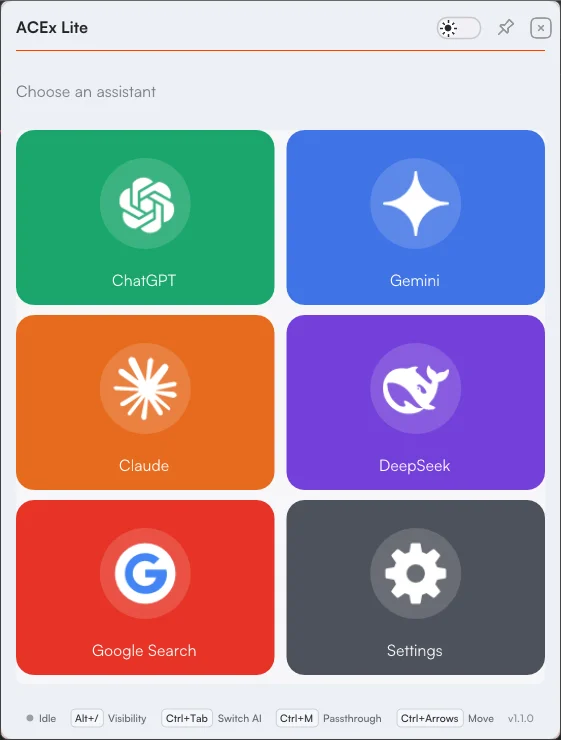
One click, any assistant
Pick ChatGPT, Gemini, Claude, DeepSeek, or Google Search from the overlay — no tabs to switch, nothing for the exam browser to block.
Built For Exam Browsers
Two things other tools can't do
Exam browsers are designed to block tools like this. Here's what gets around that.
SEB Screenshot Support
Capture inside Safe Exam Browser without the black screen that blocks every other tool.
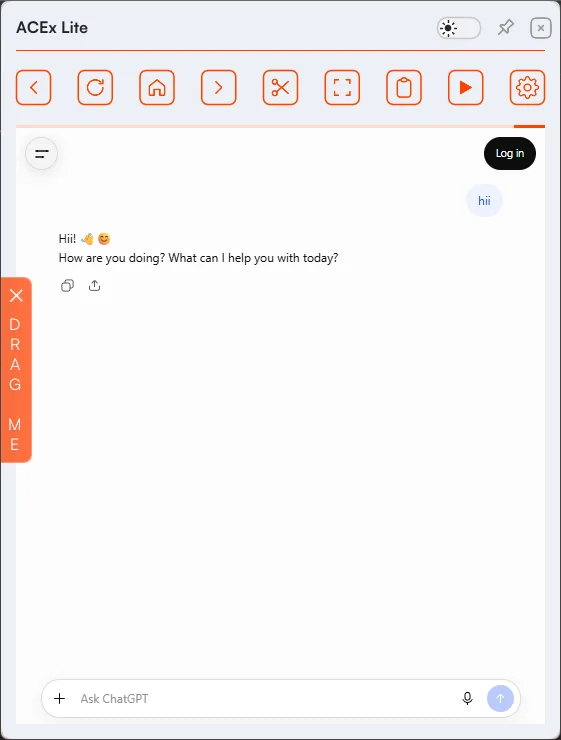
Drag Me
Drag copied AI responses directly into SEB — no clipboard restrictions to fight.
See Drag Me in action
Copy a response and the orange Drag Me tab appears on the left edge. Click and drag it into SEB to bring the answer with you, or tap the × at the top to dismiss it.
Everything Included
Lightweight, not stripped down
A focused toolkit for working inside locked-down browsers — nothing more to configure.
Display & Input
- Humanized Auto-Typer — types answers at a natural pace
- Light & Dark Mode
- Toggle Visibility — hide or show instantly
- Window Opacity — adjust transparency on the fly
- Pin Window — lock position and size from the titlebar
Snipping
- Snip Region — capture any area
- Quick Snip — instant capture
- Saved Snip Area — Quick Snip reuses your region
- Paste Screenshot — paste straight into the browser
Privacy & Reliability
- Stealth Protection — enabled by default
- Reset to Default — restores settings & clears cache
- Logout — clears browser sessions & history
Getting Started
One installer, three editions
The same install command sets up ACEx, ACExLite, or ACExInterview — you just pick which one during setup.
Run the Installer
Paste the install command from your dashboard into PowerShell and press Enter.
Choose ACExLite
The installer asks which edition to set up — select ACExLite and continue.
Log In
Sign in with your existing ACEx account. No keys to configure.
Enjoy
AI is live in your browser, ready inside SEB and MSB.
Windows Real-time and Tamper Protection must be turned off briefly during download, then switched back on. Step-by-step instructions and your install command are in the dashboard.
Already Included
Already an ACEx subscriber?
You already have ACExLite.
ACExLite runs on the same account and plan you already have — same login, no separate purchase. Pro and Elite subscribers get full access.
Not subscribed yet? See ACEx pricing.
Not On Pro or Elite Yet?
Get just ACExLite
Browser-only access, priced by the day — no ACEx desktop app included. Pick Pro or Elite instead if you want the full toolkit.
ACExLite Access
Lite · India onlyLightweight browser overlay purpose-built for locked-down browsers like SEB & MSB. Pay only for the exact days you need with zero configuration.
- SEB & MSB Browser Overlay Access
- Unlimited Session Duration
- Humanized Auto-Typer Included
- Instant Drag Me & Snip Region
- Light & Dark Exam Modes
- Stealth Screen Protection
- Zero API Key Setup Required
Fixed pricing map: ₹349 for 1 day
Found A Bug?
Help us make ACExLite better
Your feedback shapes where it goes next. Found a bug, crash, or issue? Report it and we'll fix it quickly.
Questions & Answers
Frequently Asked Questions
Do I need a separate subscription for ACExLite?
If you're on Pro or Elite, no — ACExLite is included with your existing plan at no extra cost. If you only want browser-only access without the full ACEx desktop app, India-based users can instead buy ACExLite Access on its own — a separate pay-per-day plan just for ACExLite.
Which exam browsers does ACExLite support?
ACExLite is built for Safe Exam Browser (SEB), MSB, and other restricted browser environments that have historically blocked browser-based AI overlays.
Do I need API keys or a BYOK setup?
No. ACExLite requires zero configuration — no API keys to buy, paste, or manage. Install it, log in, and start using it immediately.
Why does the installer ask me to disable Real-time and Tamper Protection?
Real-time and Tamper Protection in Windows Security can block the installer from writing the required files. You only need to turn them off temporarily during download, then re-enable them immediately afterward. Full step-by-step instructions are in your dashboard.
How is ACExLite different from the ACEx desktop app?
ACEx is a full Windows desktop overlay with the complete toolkit. ACExLite is a lighter, browser-focused overlay purpose-built for locked-down exam browsers like SEB and MSB where a desktop overlay is not the right fit.
Ready When You Are
Get AI inside your
exam browser.
Install ACExLite, log in, and you're running — no keys, no config, no black screens.
Create Account to Get ACExLiteSEB & MSB Ready · Zero Configuration · Included With Your Plan